
Improve email deliverability
Make sure your emails reach participants’ inboxes, not spam.
Email deliverability refers to your ability to successfully deliver emails to your participants’ inboxes.
It depends on:
-
Your technical configuration (domain authentication)
-
Your sending behaviour
-
Your email content
1. Authenticate your domain (essential)
The most important step is to add your custom sender email and configure:
-
DKIM
-
SPF
👉 Follow: Set up a custom sender email address
Without this:
-
Emails may be rejected
-
Sent to spam
-
Or silently blocked
2. How email sending works (AWS SES & DKIM)
Emails sent from the platform are delivered via Amazon Web Services (AWS) using Simple Email Service (SES).
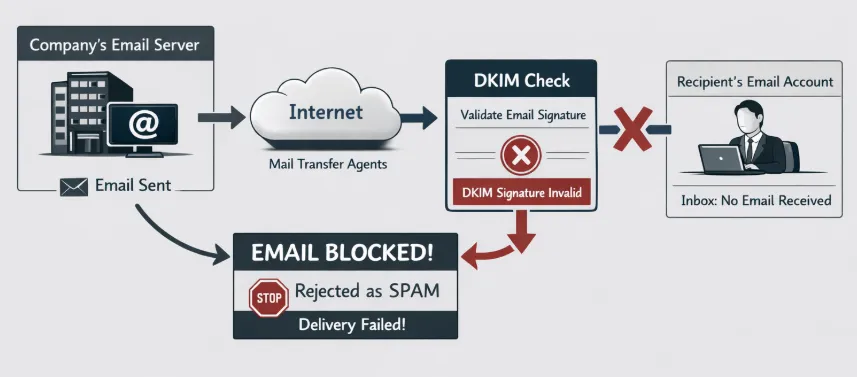
Each email is signed using DKIM (DomainKeys Identified Mail). This cryptographic signature is published in your domain’s DNS records.
What happens when you send an email:
-
The email is sent via AWS SES
-
A DKIM signature is attached
-
The recipient’s email provider:
-
Retrieves your DKIM public key from your DNS
-
Verifies the signature
-
Decides whether to accept, filter, or reject the email
-
⚠️ If DKIM is not correctly configured:
Emails may be:
-
Rejected
-
Sent to spam
-
Blocked entirely
Even if they were successfully sent from the platform.
👉 This is why proper configuration is critical, especially for:
-
Confirmation emails
-
Reminders
-
High-volume sends
3. Add DKIM and SPF records to your domain
To secure your sending reputation, you must authenticate your domain.
How to proceed:
-
Go to:
Setup → Edition settings → Advanced options → Custom email sender address -
Enter your sender email address
-
Copy the DKIM and SPF records displayed
-
Send them to your domain administrator
-
Ask them to add the records to your DNS
⚠️ Important
-
You must own the domain you are using
-
Do not replace your existing SPF record
-
It must be merged with the one provided
-
DNS changes can take up to 24 hours
Once configured, your domain will be authenticated, improving deliverability.
🔍 Verify your configuration
Before sending important emails, make sure your records are valid.
Examples of validation checks:
-
DNS lookup returns a valid result (NOERROR)
-
DKIM records are correctly detected
-
SPF record is correctly merged
👉 If needed, refer to the DKIM configuration guide for detailed setup steps.
4. General deliverability best practices
Beyond technical setup, your email content also matters.
We recommend:
-
Avoid excessive use of images
-
Avoid emojis
-
Use clear, structured content
-
Maintain a professional tone
You can also encourage participants to:
- Add your sender email to their contacts
5. Write effective subject lines
Your subject line impacts both:
-
Open rates
-
Spam filtering
Best practices:
-
Keep it short and clear
-
Avoid ALL CAPS
-
Avoid emojis
-
Clearly mention your event name
👉 A professional subject line improves trust and delivery.
6. Understand the Amazon SES suppression list
To protect sending reputation, we manage a suppression list of email addresses that we no longer send to.
An email address may be added if:
-
It results in a hard bounce (invalid address)
-
There are repeated delivery failures
-
The recipient marks the email as spam
What this means:
-
Emails will no longer be sent to these addresses
-
This protects your overall deliverability
If you are confident an address is valid, it can be removed manually upon request.
🔗 Related article
👉 Set up a custom sender email address
(This is the most important step for good deliverability)