
OneASICS
Collect OneASICS opt-ins for your participants.
This module enables you to add a OneASICS opt-in field to your forms.
1. How it works
1.1 Install the module
Go to the Store, search for OneASICS and click Install.
1.2 Add the OneASICS opt-in field to your form
-
Go to Setup → Forms
-
Edit your Individual registration form (or any other form that will be part of your workflow)
-
Add a Basic field: Opt-in Asics
-
Edit the field and open the Settings tab
-
Map the Date of birth and Country fields
⚠️ these fields must be visible and required for all your competitions
1.3 Increase OneASICS sign‑ups with a visible OneASICS banner
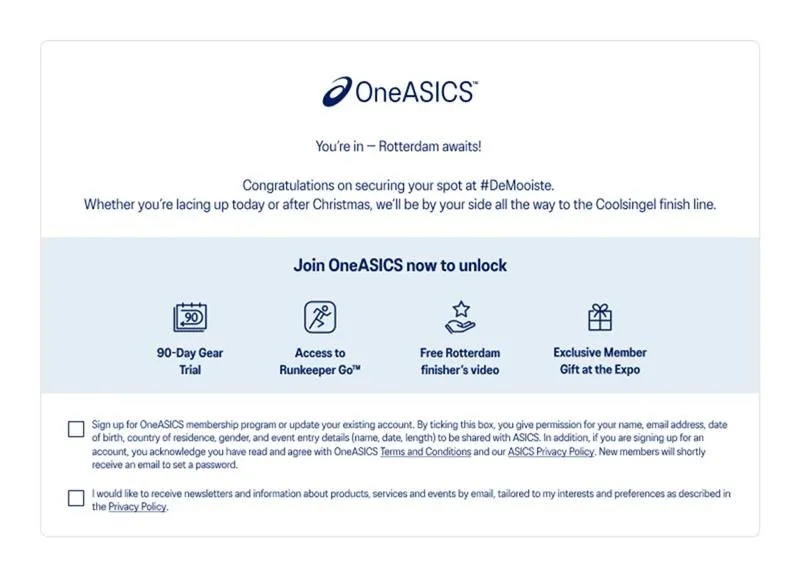
Adding a prominent OneASICS banner to the registration page increases opt‑in rates by making the program visible at the moment of sign‑up.
Example
For the Rotterdam Marathon, a OneASICS banner placed at the top of the registration page led to higher OneASICS sign‑ups compared to previous editions.
How to request a banner
Event teams should contact their regional CRM team to request a OneASICS banner.
⚠️ Do not create local banners — all assets must be provided by CRM to ensure consistency.