
How to add age restrictions on competitions
How to control participant eligibility based on age or date of birth.
1. When should I use age restrictions?
If your competition has age requirements that participants must meet in order to register, you can use the Age restriction feature to automatically enforce them.
This allows you to define a minimum and/or maximum age, based on:
-
Age on race day
-
Age during the civil year
-
Or specific birthdate ranges
Using age restrictions helps you:
-
Prevent ineligible registrations
-
Reduce manual checks
-
Ensure compliance with your event rules
2. How do age restrictions work?
Install the module:
Age restrictions per competition
Age restrictions are set individually for each competition.
Go to:
Competition settings > Advanced settings
From there, configure the following:
-
Select the date field
Choose which date of birth field the restriction should be based on.
-
Choose the restriction type
You can restrict registrations either:
-
By age
-
By date (custom birthdate range)
3. Restricting by age

When using age-based restrictions, you define:
-
A minimum age
-
A maximum age
-
A reference rule:
-
On race day
-
During the civil year
-
⚠️ Important:
When using this option, we automatically calculate the eligible birthdates for you.
3.1 Age “on race day”
Participants must meet the age requirement on the exact day of the event.
Minimum age logic
-
Participants can register if they:
-
Are already the minimum age on race day
-
OR turn that age on race day
-
✅ Example: Minimum age = 8
-
Turning 8 on race day → allowed
-
7 years + 364 days → not allowed
Maximum age logic
-
Participants can register if they:
-
Are below the maximum age
-
Are the maximum age + 364 days
-
❗ Important nuance:
If maximum age = 15, then:
-
15 + 364 days or under on race day → allowed
-
Turning 16 on race day → not allowed
3.3 Age “during the civil year”
Participants must reach the required age at any point during the calendar year.
This means:
- A participant who turns the required age later in the year can still register, even if they are younger on race day
👉 This is commonly used for federation rules.
4. Restricting by date (recommended for precision)
Instead of defining age, you can define exact birthdate limits.
This gives you full control over eligibility and avoids edge cases.
Why use date-based restrictions?
Use this method when you need:
-
Strict control over eligibility
-
No ambiguity around birthdays
-
Alignment with official race regulations
Example: Junior race
You want:
-
Minimum age: 8
-
Maximum age: 15
-
Strict rule: no participant should be 16 on race day
→ Correct setup using dates
If race date = 31/12/2026
Set:
-
Minimum birthdate = 31/12/2018
→ participant can turn 8 on race day -
Maximum birthdate = 01/01/2011
→ participant cannot be 16, even on race day
👉 This ensures:
-
Minimum age is respected
-
Maximum age is strictly enforced
-
No edge cases around birthdays

5. Important note about displaying age
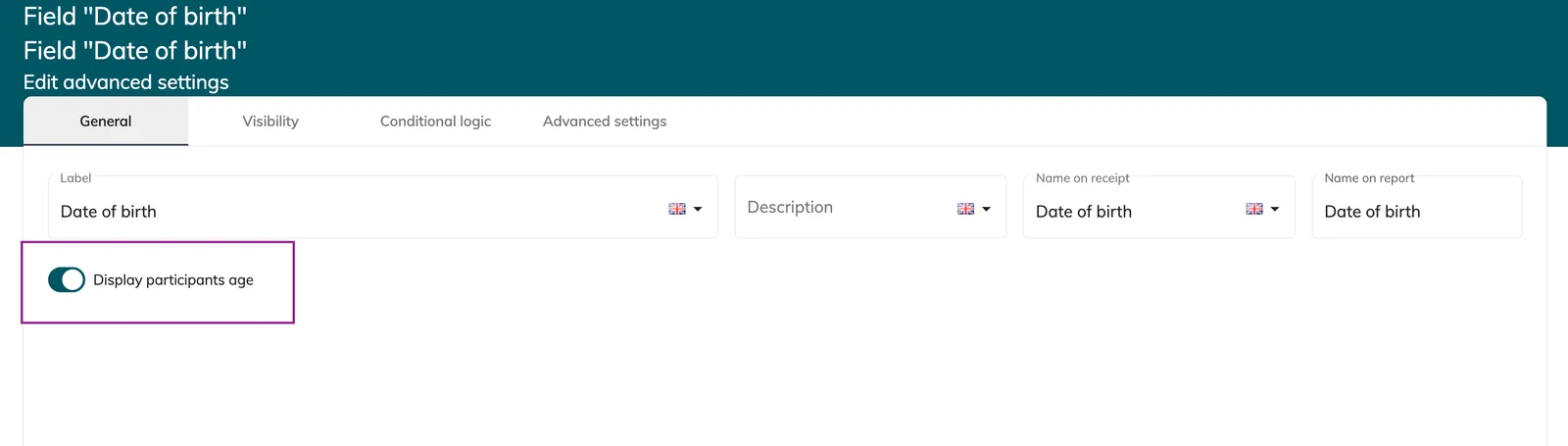
In your form settings, you can display the participant’s age under the Date of Birth field.
⚠️ Please note:
-
The displayed age is always calculated based on race day
-
If your restriction is based on civil year, this may cause confusion
👉 Recommendation:
Make sure your display logic matches your restriction logic to avoid misunderstandings.
6. Best practices
-
Use age-based restrictions for simple rules
-
Use date-based restrictions when precision is critical
-
Always test edge cases (birthdays close to race day)
If you are unsure about the best configuration for your event, our team is happy to guide you.